Why I built Tura
I have always been a fan of croc. It is a great tool that just works when you need to send files between computers. Using it so much got me thinking about how it actually handles those transfers under the hood. I decided I wanted to build my own version, a peer-to-peer CLI file transfer tool I named Tura.
This is how it went, what I tried first, what completely failed, and how the architecture slowly changed.
The First Try: Direct Connections
The first idea was simple. Just do peer-to-peer.
My computer should directly connect to your computer. No server in between. That feels like the "correct" way to do it.
The problem is routers. Our computers only know their local IP address, not the public one because of NAT (Network Address Translation). To find these, I used STUN. Both clients would hit a STUN server and get their public IP and the port their router exposed.
Now both sides had this info, but they still needed to exchange it. For that, I used MQTT since it is lightweight and easy for this kind of signaling.
So the flow became:
- both clients get public IP + port via STUN
- they publish it on an MQTT topic
- the other side reads it
Once both sides had each other's info, they would try UDP hole punching.
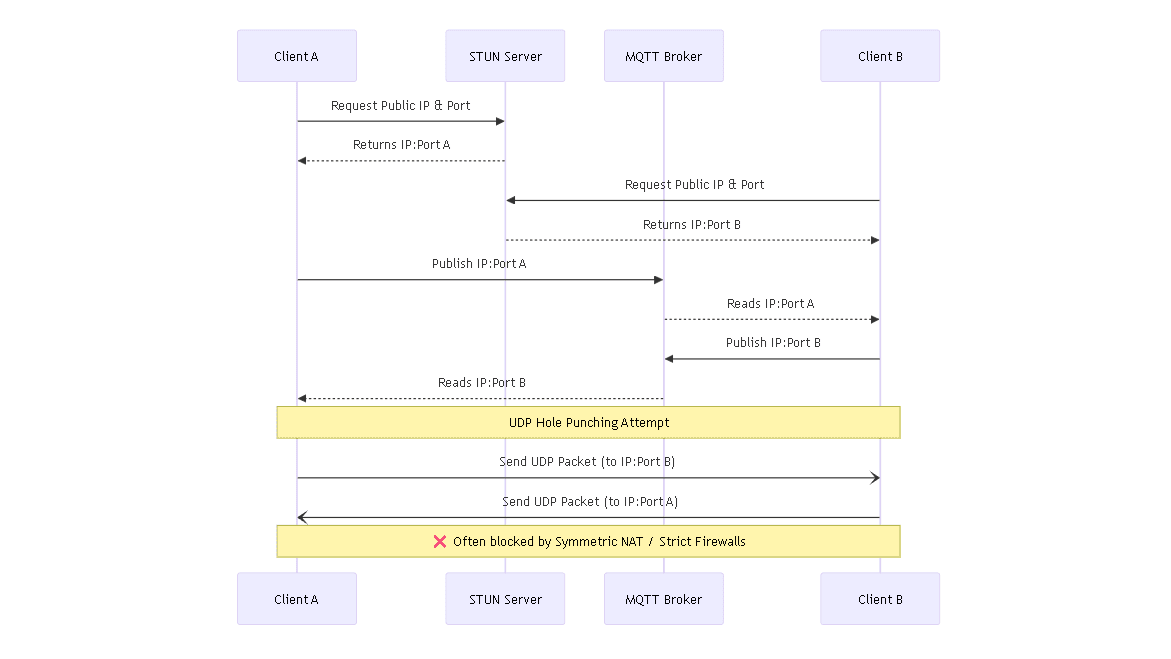
On paper, this looked really nice.
In reality, it broke instantly.
Different networks behave very differently. Some routers use Symmetric NAT, where the port changes for every connection. So the port you shared becomes useless almost immediately.
On top of that, strict firewalls just drop unknown UDP packets entirely.
So sometimes it worked, sometimes it did not. Mostly it did not.
At that point it was clear: this approach is unreliable in real-world conditions. I had to drop it.
The Pivot: Using a TCP Relay
Since direct connections were not reliable, I needed a fallback that always works.
That is when I looked back at croc and realized they use a relay server when needed.
So I switched to that approach.
Instead of trying to connect to each other, both clients connect to a central TCP relay server.
Outbound connections are almost always allowed by routers, so this works consistently.
Once both clients are connected, the relay does not do anything fancy. It just forwards data from sender to receiver.
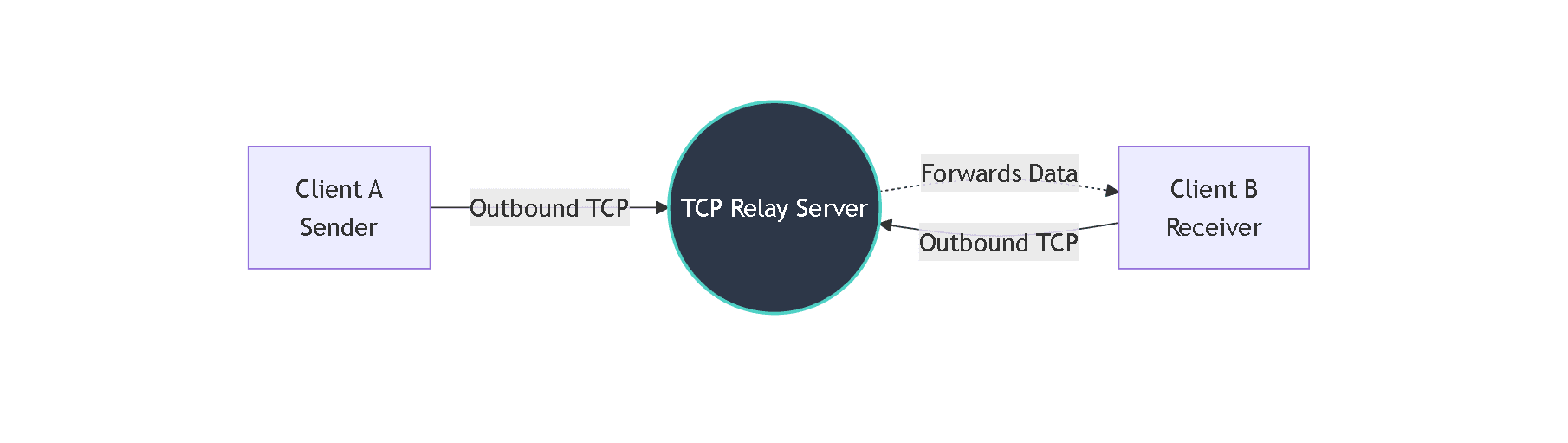
Finally, I was able to send a file successfully from one machine to another without random failures.
That was a big milestone.
The Speed Issue: Chunking the Data
Now that the connection was stable, the next problem was actually transferring files efficiently.
You cannot just dump a large file into a socket in one go. It needs to be broken into smaller pieces.
I chose 64KB chunks (buckets).
The flow was:
- read 64KB from disk
- send it over the network
- wait for it to finish
- repeat
On the receiving side:
- read incoming chunks
- write them to disk
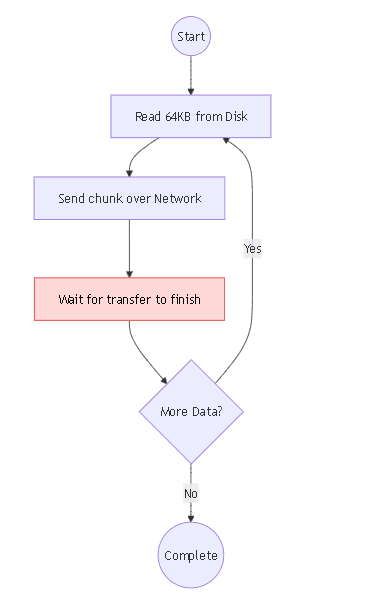
This worked fine in terms of correctness.
But performance was bad.
I was getting around 500KB/s to 1MB/s, which is way too slow.
The issue was the flow itself. Everything was sequential.
While reading from disk, the network was idle.
While sending data, disk was idle.
So even though both components were fast individually, they were not being used efficiently together.
Fixing the Bottleneck: Multithreading
To fix this, I needed concurrency.
Instead of a single stream handling the entire file, I split the work across multiple threads.
I divided the file into parts and started 4 parallel streams. Each thread handled its own chunk of the file independently: reading, sending, everything.
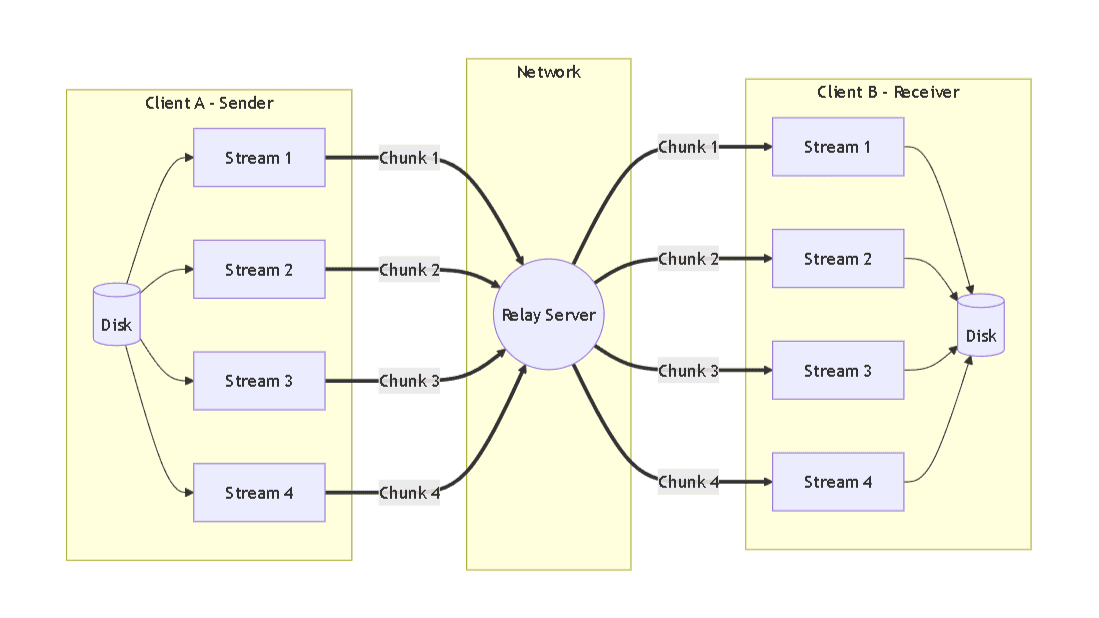
Now things started to improve.
Disk and network were both being used continuously instead of waiting on each other.
The difference was huge.
When I ran the relay server locally on my own machine, the transfer speed went up to around 1GB/s.
To test it in a more realistic setup, I exposed the server using a tunneling tool and asked a friend to try it.
We got around 4 to 5MB/s consistently.
That drop was not because of my system. It was the limitation of the free tunneling service.
So at this point, performance-wise, things were in a good place.
Securing the Transfer
Now came the security part.
Since all data was going through the relay server, it could technically read everything being transferred. That did not feel right.
So I added end-to-end encryption.
I used the chacha20poly1305 crate, which is a well-known and reliable encryption method.
This changed the pipeline a bit.
Before sending each chunk:
- data gets encrypted using a shared key

The relay server just forwards encrypted data, which looks like random bytes.
On the receiving side:
- data is decrypted before writing to disk
So even though the relay is in the middle, it has no idea what is being transferred.
The Cost of Encryption
Encryption solved the privacy issue, but it came with a cost.
Every chunk now had to go through encryption before sending and decryption after receiving.
When I tested locally again:
- speed dropped from ~1GB/s to ~500 to 600MB/s
The CPU was the bottleneck this time.
I tried optimizing by increasing chunk size so fewer encryption calls would happen.
But that created new problems:
- memory usage increased a lot
- network handling became messy
So I went back to 64KB chunks.
At that point, it felt like the right balance.
Even with the drop, 500MB/s is still very fast, and the added security is worth it.
Conclusion
Building Tura helped me understand a lot of things.
Direct peer-to-peer sounds ideal, but real-world networks make it unreliable. That is why relay-based systems are so common.
I also saw how much difference concurrency makes, and how encryption introduces real tradeoffs with performance.
A lot of this was trial and error. Things broke multiple times before working properly.
But that is honestly the best part of building something like this.